

ScriptWriter
Automated no-code scripting
Build and execute automated testing scenarios with ease.

When new changes are introduced, tests are run automatically.
Reduce data creation and testing time from days to minutes.
Improve overall solution accuracy.
90%
Reduction in data creation and test execution tasks
50%
Improvement in issue identification time
30%
Improvement in system stability
ScriptWriter
Automated no-code scripting
Build and execute automated testing scenarios with ease.
When new changes are introduced, tests are run automatically.
Reduce data creation and testing time from days to minutes.
Improve overall solution accuracy.
90%
Reduction in data creation and test execution tasks
50%
Improvement in issue identification time
30%
Improvement in system stability
How ScriptWriter works




-
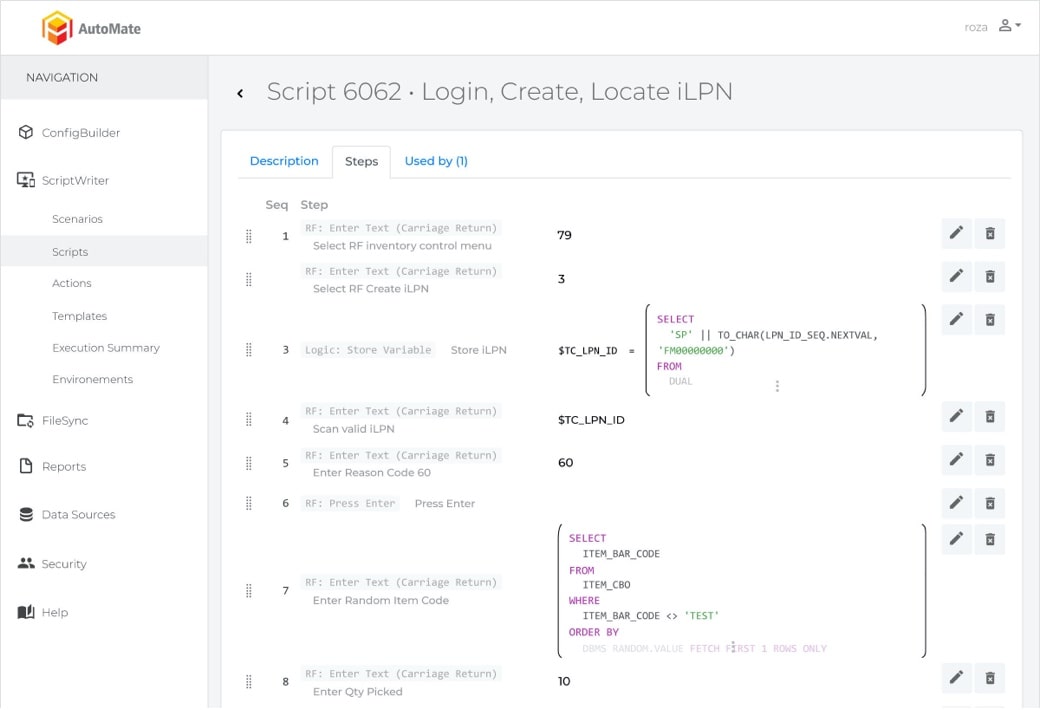
Make a script
Say goodbye to tedious manual tests. Link together multiple actions like open pallet page or enter LPN number to effortlessly create a script.
-
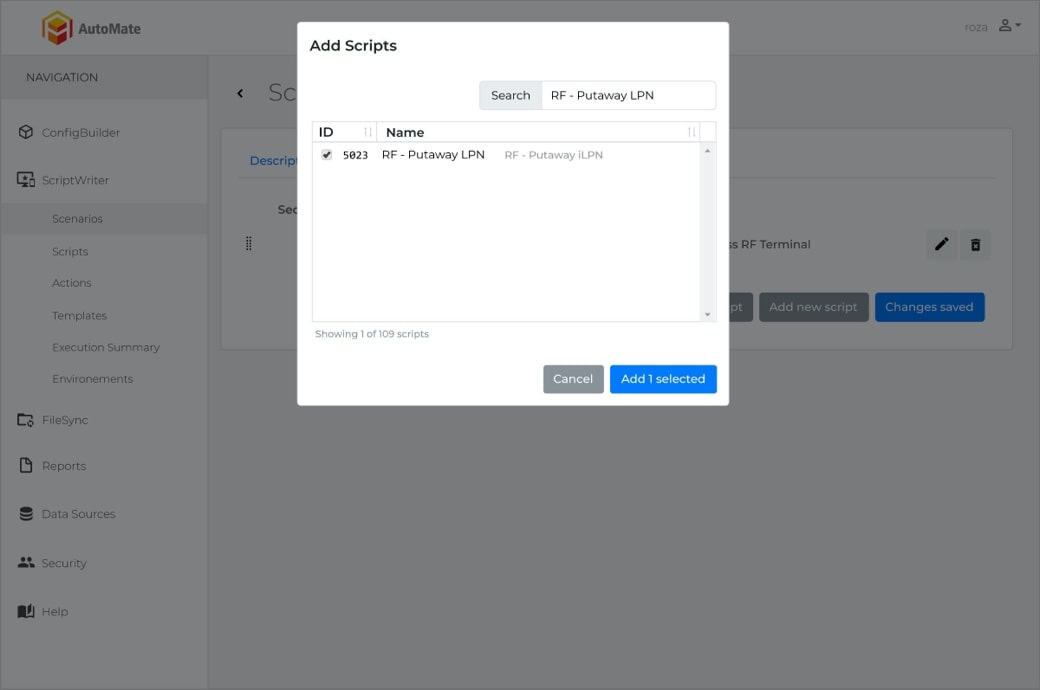
Link scripts to make a scenario
What typically takes hours to accomplish manually is now done in seconds. With the click of a button, execute or schedule your migration and let ConfigBuilder do the work.
-
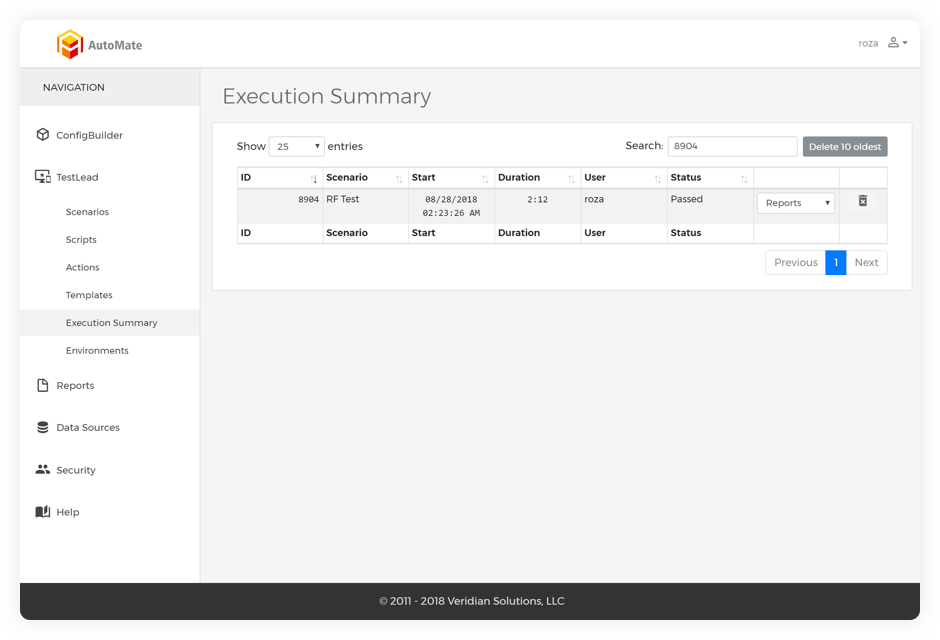
Execute scenario
In under 25% of the time, it would take you to complete manually, execute scenarios on-demand or schedule it for the time you would like.
-
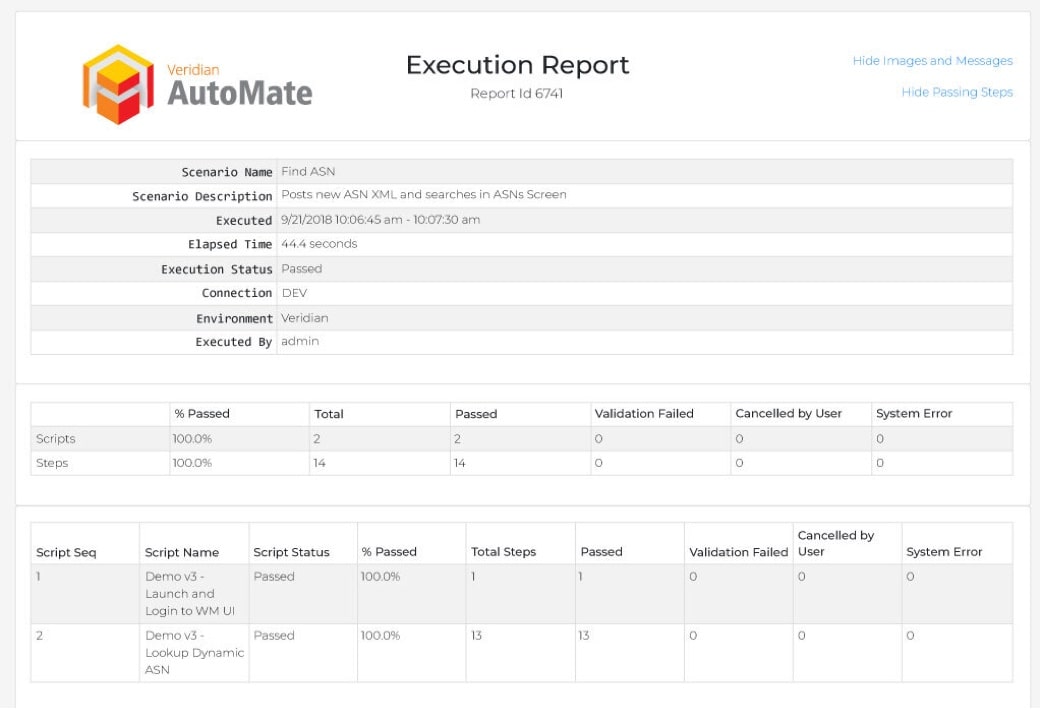
Validate results
Automatically execute tests and review a summary of results, including screenshots. Ensure data accuracy every step of the way by validating your results through TestLead.

Meeting customer demands in an evolving world
Is your system fast enough to adapt to constantly changing business demands? With TestLead, implement changes to your production system with confidence.
Developed specifically to make your life easier
Clean, simple, and engineered with the user experience in mind, TestLead completes once painful, tedious validations in seconds.

What is ScriptWriter?
ScriptWriter is Veridian's no-code scripting and automated testing tool for Manhattan Associates WMS and OMS. It lets a business analyst or tester build automated test scenarios by linking together system actions, run them on demand or on a schedule, and have them run automatically whenever a change is introduced. Results, including screenshots, are validated and summarized through TestLead. ScriptWriter is part of the AutoMate suite with ConfigBuilder and FileSync.
What problem does it remove?
Testing a warehouse or order management system by hand is slow and repetitive. Every configuration change, patch or release needs the same receiving, putaway, picking, packing and shipping scenarios executed again, with test data created for each run. Teams either spend days on it or skip regression testing and find the defects in production. ScriptWriter reduces data creation and testing time from days to minutes, runs the regression suite automatically when changes are introduced, and improves overall solution accuracy.
How does ScriptWriter work?
- Make a script. Link together actions such as opening the pallet page or entering an LPN number to create a script. No code is written.
- Link scripts into a scenario. Combine scripts into an end-to-end business scenario, for example receive, putaway, wave, pick, pack and ship.
- Execute the scenario. Run it on demand or schedule it, in a fraction of the time a manual run takes.
- Validate results. Review a summary of results with screenshots, and confirm data accuracy at every step through TestLead.
Which Manhattan Associates products does it support?
ScriptWriter supports Manhattan Associates WMS and OMS. Scripts are built from the screens and transactions of those products, so the tests exercise the system the way your users do.
Before and after
| Task | Manual testing | With ScriptWriter |
|---|---|---|
| Create test data for a regression run | Keyed by hand for every cycle. | Generated by the script each time it runs. |
| Regression-test a configuration change | Days of manual execution, often skipped under deadline pressure. | Runs automatically when the change is introduced. |
| Prove a test passed | Tester notes and memory. | A results summary with screenshots for every step. |
| Re-test after a patch or release | Start over. | Re-run the existing scenario library. |
The results reported on this page from Veridian's use of ScriptWriter are a 90% reduction in data creation and test execution tasks, a 50% improvement in issue identification time and a 30% improvement in system stability.
Who uses ScriptWriter?
Project teams use it to build a test library once during an implementation and reuse it for every later change. Support and optimization teams use it to regression-test fixes before they reach production. Operations leaders use it to answer the question "is our system fast enough to adapt to changing business demands?" with confidence, because changes to the production system are tested automatically before they go live.
How do I see it?
Request a demo and we will build and run a scenario against a Manhattan Associates environment, or call (770) 225-1750.
Frequently asked questions
What does ScriptWriter do?
ScriptWriter builds and executes automated test scenarios for Manhattan Associates WMS and OMS without code. Tests can run on demand, on a schedule, or automatically when a change is introduced, and results are validated through TestLead.
Do I need to write code to use ScriptWriter?
No. Scripts are built by linking system actions, such as opening a page or entering an LPN, and scripts are linked together into scenarios.
What is TestLead?
TestLead is the results and validation component used with ScriptWriter. It presents a summary of each run, including screenshots, and validates data accuracy at every step.
Which systems does ScriptWriter support?
Manhattan Associates warehouse management and order management systems.
What results have been reported?
The figures shown on this page are a 90% reduction in data creation and test execution tasks, a 50% improvement in issue identification time and a 30% improvement in system stability.
Can ScriptWriter be used after go-live?
Yes. The scenario library built during implementation is reused to regression-test every later configuration change, patch and release.
See our automation tools for yourself
Ensuring a successful implementation has never been easier with the help of Veridian’s modern approach to supply chain technology, expert staff, and automation tools.

See our automation tools for yourself
Ensuring a successful implementation has never been easier with the help of Veridian’s modern approach to supply chain technology, expert staff, and automation tools.